
Seven receipt apps, compared by the work they are built to do
Explore Scan Pro Receipts · Android receipt-scanning guide · Free Windows Desktop Companion
The best receipt scanning app depends on what must happen after the picture is taken. A contractor may need a PDF and CSV for a bookkeeper. An employee may need approvals and reimbursement. An accountant may want documents sent directly into accounting software. A household may simply want private records that remain easy to find.
This comparison looks at seven Android receipt scanning options by workflow rather than pretending that one app is best for everyone. It covers capture, OCR, review, storage, offline use, reporting, team features, integrations, and pricing approach.
How this comparison was prepared: Features and pricing were reviewed from official product pages, pricing pages, help information, and Google Play listings on September 28, 2026. We did not perform a controlled OCR accuracy benchmark. Receipt recognition varies with image quality, language, paper condition, store layout, and the corrections made by the user. Scan Pro Receipts is our product; competing products are described from their published information and linked to their official sources.
Receipt scanning apps compared at a glance
| App | Strong fit | Pricing approach | Important consideration |
|---|---|---|---|
| Scan Pro Receipts | Private, offline-first Android records and customizable reports | Two-month trial, then one-time lifetime purchase | No team approval system or automatic accounting-platform publishing |
| Smart Receipts | Cloud-backed expense tracking, mileage, and reports across mobile and web | Free manual-entry tier; subscription tiers for OCR, cloud backup, web, and advanced features | OCR and cloud/web features depend on a paid subscription |
| Expensify | Employee expenses, reimbursement, cards, approvals, and accounting sync | Workspace subscription | Broader company workflow may be more than a solo record keeper needs |
| Zoho Expense | Teams that need expense reports, travel, policies, and approvals | Free and per-user subscription plans with scan limits | Autoscan allowances and workflow features vary by plan |
| Dext | Businesses and accountants moving source documents into bookkeeping systems | Business subscription based on users and document volume | Designed around accounting automation rather than simple personal storage |
| Shoeboxed | Businesses that want mobile capture plus mailed paper-receipt scanning | Subscription plans with digital and paper scan allowances | Physical-mail service and accounting workflow may be unnecessary for lighter use |
| Veryfi | Developers and businesses needing receipt OCR APIs and capture SDKs | Usage and platform pricing | Primarily a document-intelligence platform, not the simplest consumer record app |
1. Scan Pro Receipts: offline control and flexible reports
Scan Pro Receipts is built for individuals, contractors, drivers, field salespeople, and small businesses that want to capture, review, organize, and export receipt records without making a cloud account the centre of the workflow.
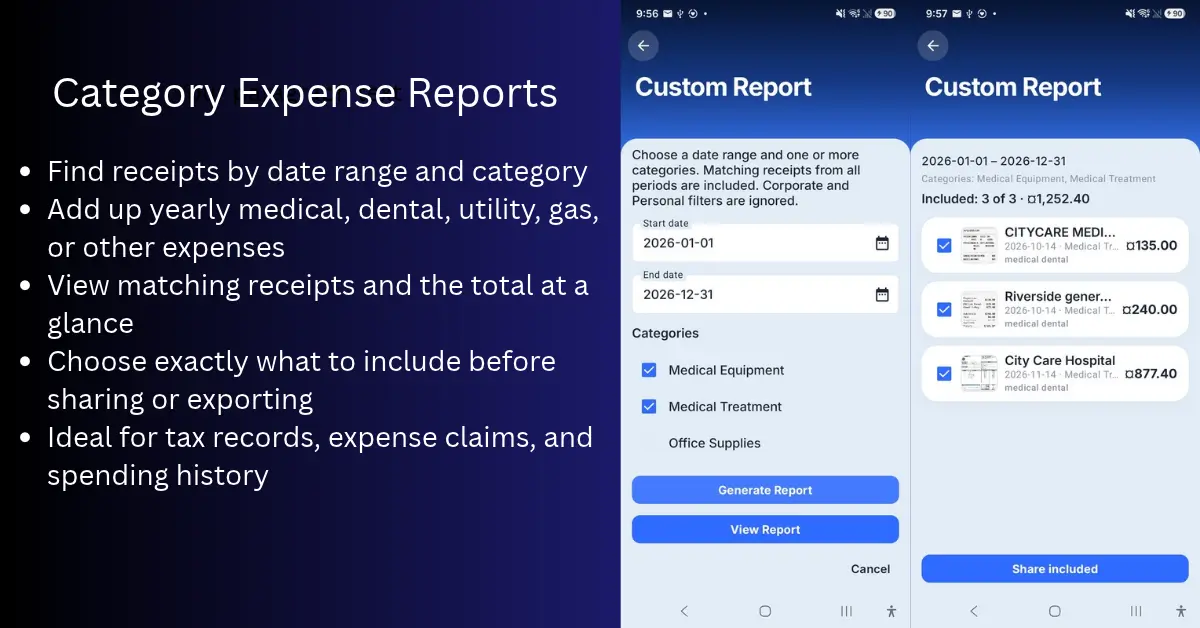
The Android app supports camera capture plus gallery and file imports. On-device OCR and receipt field logic help fill merchant, date, subtotal, tax, total, and currency information, while keeping each field available for review and correction. Receipts can be organized into fiscal periods and categories, then exported through configurable PDF, CSV, and image-inclusive reports.
The working records stay on the device, the app works without mobile data, there are no ads, and backups go to locations chosen by the user. The two-month trial is followed by a one-time $29.99 lifetime purchase rather than a monthly subscription.
The free Scan Pro Desktop Companion for Windows extends the workflow to a larger screen for archive imports, filtering, search, batch edits, duplicate review, category totals, printing, and exports.
Choose Scan Pro when: local processing, offline access, user-controlled storage, customizable reports, and one-time pricing matter more than team approvals or direct accounting-platform synchronization.
2. Smart Receipts: mobile and web expense tracking
Smart Receipts combines mobile receipt tracking, mileage, expense reports, and web access. Its official site lists Android and iOS support, PDF and CSV reporting, cloud backup, email forwarding, and bank connections at different plan levels.
The free tier is designed around manual receipt entry and basic reports. Its published pricing places AI-powered recognition, automatic cloud backup, email forwarding, web access, and advanced exports in the Pro subscription, while the Max subscription adds bank connections and statement imports. Current prices and in-app purchase amounts should be confirmed on the official pricing section.
Choose Smart Receipts when: you want a cloud-backed mobile-and-web workflow, mileage features, or bank-connected expense tracking and are comfortable with subscriptions for advanced capabilities.
3. Expensify: reimbursement and company expense workflows
Expensify is designed around a broader business expense process. Its SmartScan feature extracts fields such as merchant, date, total, and currency from paper or digital receipts. The mobile app is available for Android and iOS.
Expensify goes beyond personal receipt storage with reports, company cards, approvals, reimbursement, card feeds, travel, invoicing, and integrations such as QuickBooks Online and Xero. Its published Collect plan is priced per member per month; confirm the latest terms on the official Expensify pricing page.
Choose Expensify when: employees need to submit expenses and the organization needs approvals, reimbursement, cards, and accounting connections.
4. Zoho Expense: structured team approvals and travel
Zoho Expense is another company-focused platform. Its Android app supports receipt Autoscan, expense reports, mileage, card transactions, travel itineraries, report submission, and manager approvals. Zoho also says expenses can be added offline and synchronized when a connection returns.
Zoho’s official pricing information lists free and paid plans with different monthly Autoscan allowances. The free and trial levels have lower scan limits, while Standard and Premium increase the allowance and expand workflow controls.
Choose Zoho Expense when: your team needs travel management, policy controls, expense submission, and approval workflows—especially if the business already uses Zoho products.
5. Dext: source documents for bookkeeping systems
Dext focuses on moving receipts, invoices, and other source documents into bookkeeping workflows. Its mobile app captures documents, extracts data, and connects with accounting products such as QuickBooks and Xero.
Dext’s business subscriptions are organized around users and document volume, with additional extraction and automation capabilities available by plan or add-on. Review the current terms on the official Dext pricing page.
Choose Dext when: the primary goal is getting business documents into an accountant’s or bookkeeper’s connected system rather than maintaining a private standalone receipt archive.
6. Shoeboxed: digital capture plus mailed paper receipts
Shoeboxed combines an Android and iOS receipt app with a distinctive physical-document service. Users can capture digital receipts or use a prepaid Magic Envelope to mail paper receipts for scanning and organization.
Its plans include different digital-scan, paper-scan, envelope, user, storage, mileage, reporting, and accounting-integration allowances. The exact limits vary by subscription, so consult the official Shoeboxed pricing page.
Choose Shoeboxed when: you have a significant backlog of paper receipts and value a service that can physically scan mailed documents for you.
7. Veryfi: receipt intelligence for software and automation
Veryfi is primarily a receipt OCR API and document-intelligence platform. It extracts structured fields and line items from images and PDFs, while its mobile capture SDK supports Android and iOS applications.
This makes Veryfi relevant to businesses building receipt processing into their own products or automated systems. Its platform pricing is based on document processing, SDK, and service requirements rather than a simple personal receipt-app purchase.
Choose Veryfi when: you are a developer or business that needs programmable receipt extraction, fraud signals, SDK integration, or high-volume document automation.
Which receipt scanning app fits your workflow?
- Private, offline Android records and flexible reports: Scan Pro Receipts
- Cloud-backed mobile and web expense tracking: Smart Receipts
- Employee reimbursement and company cards: Expensify
- Team travel, policy, and approval workflows: Zoho Expense
- Bookkeeping and accounting-system document flow: Dext
- Mailed paper-receipt digitization: Shoeboxed
- Receipt OCR APIs and embedded capture: Veryfi
Before choosing, test the workflow with the receipts you actually handle: a faded thermal slip, a restaurant receipt with a tip, a fuel receipt, a foreign-currency purchase, and a downloaded invoice. Check not only what the OCR reads, but how quickly you can correct fields, organize the record, retrieve it later, and produce the file another person needs.
Why Scan Pro takes a different approach
Many capable competitors are built around cloud automation, connected accounts, employee approvals, or accounting integrations. Scan Pro Receipts deliberately focuses on a different need: private Android receipt records that remain usable offline and can be turned into office-ready reports without another monthly subscription.
That narrower focus will not suit every organization. It can be a strong fit for someone who wants reviewable on-device OCR, fiscal periods, categories, currency conversion, configurable PDF and CSV output, user-controlled backups, and a free Windows companion.
Try the workflow with your own receipts before deciding
Try Scan Pro Receipts on Google Play · Explore reporting features · Get the free Windows companion
Related: What to look for in an Android receipt scanning app · Best offline receipt scanner app for reports · Lifetime app versus subscription software · Offline reports and exports
Try Scan Pro Receipts on Google Play
- Free Trial: Get full access with a 2-month free trial via Google Play.
- No Subscriptions: Keep your data private for a one-time lifetime payment of $29.99.
- Explore Features: View the full list of Reporting & Export Features.
- Tax Preparation: See how to organize your Receipt Records for Tax Time.